
Tighten audio with your DAW's own quantize.
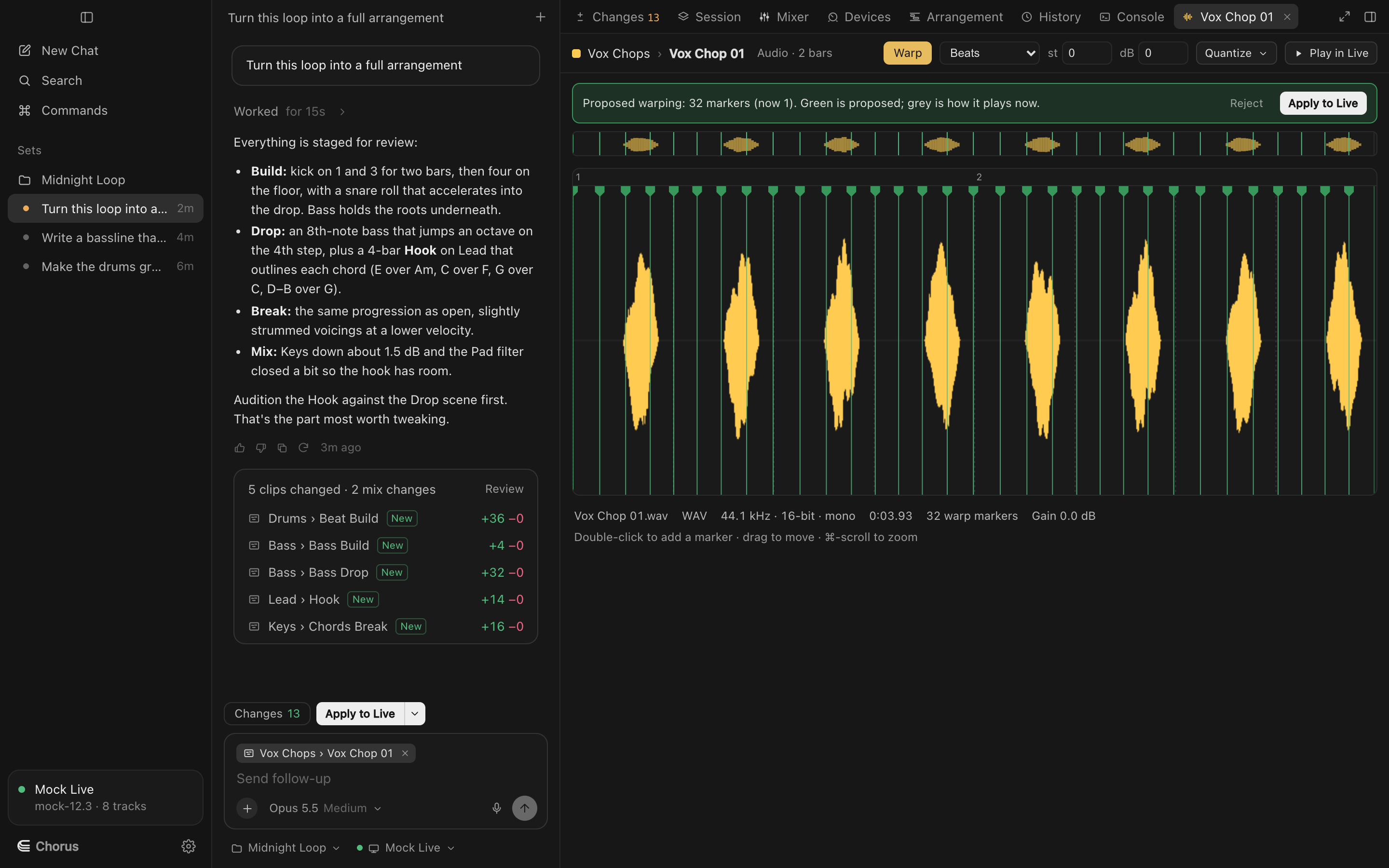
In Live, Chorus runs audio Quantize on a throwaway copy, so you see exactly the warp markers Live would set before your clip changes. In Logic, it proposes the region's Quantize, Flex mode, transpose and gain.
See where the audio sits. The clip's waveform with Live's warp markers and the bar grid they put on it. Drag a marker onto a transient, double-click to add one, Delete to remove one.
Audio clips
Quantize
1/32 to 1/4, at a strength you choose, as a proposal you can apply or reject.
Warp mode (Live)
Beats, Tones, Texture, Re-Pitch, Complex and Complex Pro.
Transpose
In semitones, with detune in cents.
Clip gain in dB
Set in decibels; Chorus measured Live's clip gain curve so −6 dB means −6 dB.
In Logic
Region Quantize and Q-Strength through Flex, the track's flex mode (Slicing, Rhythmic, Monophonic, Polyphonic and more), transpose, fine tune and region gain, each with undo. Logic doesn't share flex markers, so there's no waveform editing there.
Try Chorus on your next session.
Free to download for macOS, for Ableton Live 12, Logic Pro 12 and FL Studio. Bring your own Anthropic key.